
How to Create a Summit Funnel
Published: Updated:
Hosting a virtual summit is a powerful way to grow your audience and build authority—but assembling all the right funnel pages can be time-consuming. ClickFunnels helps simplify the process with ready-made funnel templates you can customize. You can create your funnel and customize content to match your event with just a few clicks. In this article, you’ll learn what pages a Summit Funnel includes, their purpose, and how to get started quickly.
Requirements
Section titled “Requirements”-
An active ClickFunnels account
-
Products created for the summit
-
Payments AI connected to the workspace (to use Stripe, connect it through Payments AI), or an existing direct Stripe connection
What is a Summit Funnel
Section titled “What is a Summit Funnel”A Summit Funnel is a sequence of pages designed to host an online summit—usually featuring expert speakers or multiple sessions over one or more days. It’s a strategic way to offer valuable content, grow your email list, and create upsell opportunities.
Example: Health Coach Hosting a Wellness Summit
Section titled “Example: Health Coach Hosting a Wellness Summit”Imagine you’re a health coach planning a “3-Day Wellness Summit.” You invite guest speakers to talk about fitness, nutrition, and mental well-being. Visitors first land on your Optin Page to register. Once they sign up, they’re offered an All Access Pass (Order Page) to get lifetime access to all summit recordings and exclusive bonuses. After purchase or registration, they reach the Thank You Page with access instructions. Finally, they visit the Summit Page(s), where all the session videos are available.
Summit Funnel Structure
Section titled “Summit Funnel Structure”A traditional Summit Funnel includes a series of core pages that work together to guide your visitors through registration, offer upgrades, and deliver your summit content.
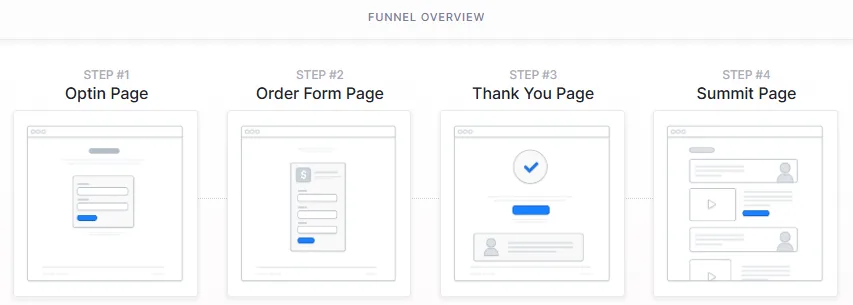
Funnel Overview:
Section titled “Funnel Overview:”-
Optin Page: This is the first page your visitors see. It captures their name and email address so they can register for your summit.
-
Order Form Page (All Access Pass): After registration, visitors are directed to an order page where they can purchase an All Access Pass—offering lifetime access to content, bonuses, or exclusive materials.
-
Thank You Page: After registering (or purchasing), visitors land on a Thank You Page. This page confirms their registration and provides key instructions or next steps.
-
Summit Page(s): This is where your actual summit content is hosted. These page(s) are typically accessed through scheduled email links—such as Day 1, Day 2, Day 3 content links—delivered over the course of the event. Each link is time-sensitive and access may expire after each day to encourage real-time participation and upsell conversions.
Creating a Summit Funnel in ClickFunnels
Section titled “Creating a Summit Funnel in ClickFunnels”Follow these steps to quickly create your Summit Funnel using one of the available templates:
-
Go to Funnels and click Create Funnel. The Funnel Templates page opens.
-
Use Search, or open Filters and pick a Funnel Type (Lead Funnels, Product Funnels, Presentation Funnels, Appointment Funnels or Challenge Funnels), to find a template that fits your Summit funnel. Click Preview to look through it, then click Use This Template. ClickFunnels installs the funnel and opens it in the funnel editor.
-
Prefer to build it yourself? Click Start From Scratch, or let Build with AI create the funnel for you.
For the full steps, see How to Create a New Funnel.
Once your funnel is created, update each page by editing the text, images, videos, and connecting products where needed.
Adding Products to the Order Page
Section titled “Adding Products to the Order Page”Once your Summit Funnel is created, it’s important to connect your product to the Order Page—commonly used to sell the All Access Pass.
This step allows you to collect payments and deliver access to your premium offer. Without linking a product, your order form will not function, and users won’t be able to complete a purchase.
The All Access Pass traditionally includes:
-
Lifetime access to summit recordings
-
Exclusive speaker bonuses
-
VIP session replays or private workshops
By attaching a product to the order page, you enable payment processing, track sales analytics, and ensure that buyers receive the right access or offer immediately after checkout.
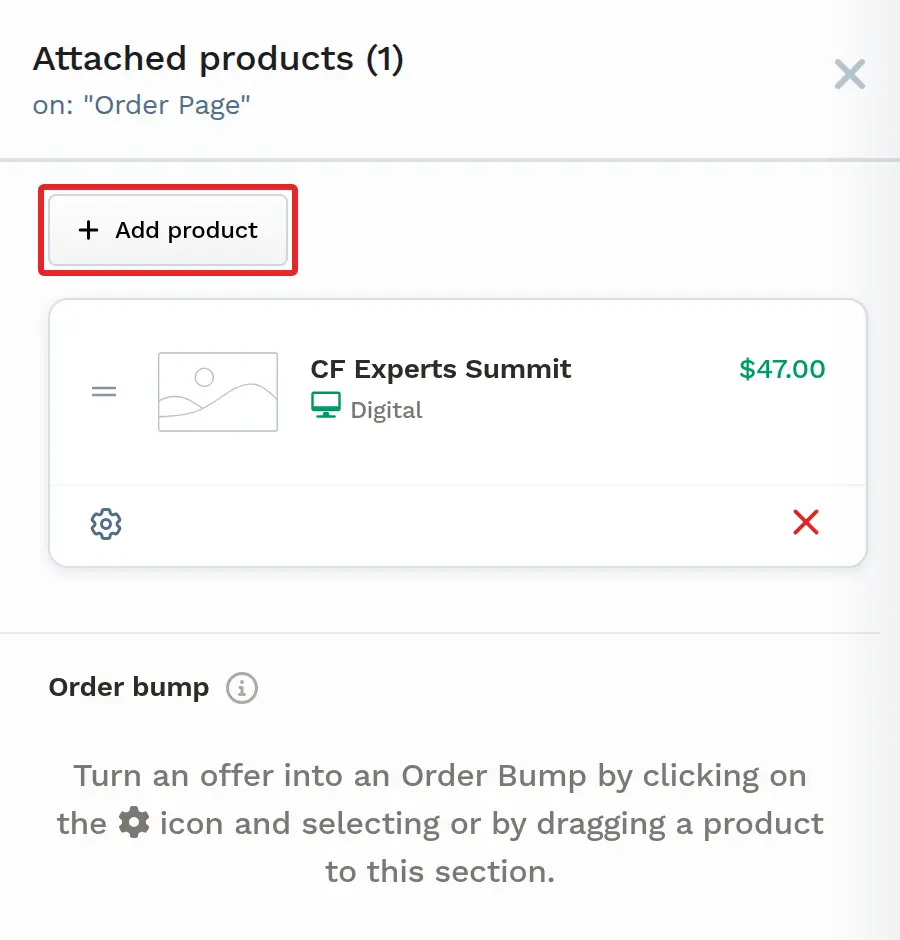
On the Order Page step of your Summit Funnel, open the ⋮ menu and select Add Products (or click the step’s green Products icon), click + Add product, and select your All Access Pass product. If you create a new product from there, it opens in a new browser tab and isn’t attached to the step automatically, so return to the funnel and select it. For the full steps, see Adding Products in a Funnel Step and Adding a Checkout (Order Form) Page in a Funnel.
Sending Automated Emails Using a Workflow
Section titled “Sending Automated Emails Using a Workflow”To ensure your attendees receive summit content on time and stay engaged throughout the event, it’s essential to send automated emails using a Workflow in ClickFunnels.
Common Email Types:
Section titled “Common Email Types:”-
Welcome Email: Immediately after registration, send a confirmation email with event details.
-
Day-by-Day Access Emails: For multi-day summits, schedule daily emails with links to that day’s Summit Page.
-
Reminder Emails: Send reminders before each day’s content goes live to boost attendance.
-
All Access Pass Upsell Emails: Encourage attendees to upgrade by highlighting exclusive benefits.
-
Post-Summit Follow-Up: After the event, continue the conversation with bonus offers, replay access, or product promotions.
Attaching Workflows to a Funnel Step
Section titled “Attaching Workflows to a Funnel Step”Once your email workflow is ready, you can connect it to your Summit Funnel so that contacts automatically enter the sequence based on their activity.
To attach a workflow:
-
Open your Summit Funnel and select the funnel step where you want the automation to begin (e.g., Optin Page or Order Form Page).
-
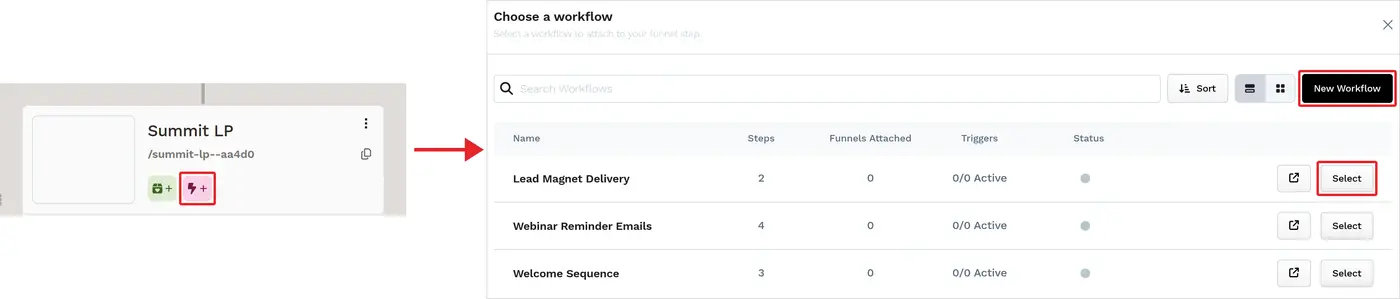
Click the Lightning Bolt (⚡) icon on the funnel step. In the Choose a workflow dialog, select an existing workflow, choose the Events that trigger it, and click Attach workflow. To build a new one instead, click New Workflow.
-
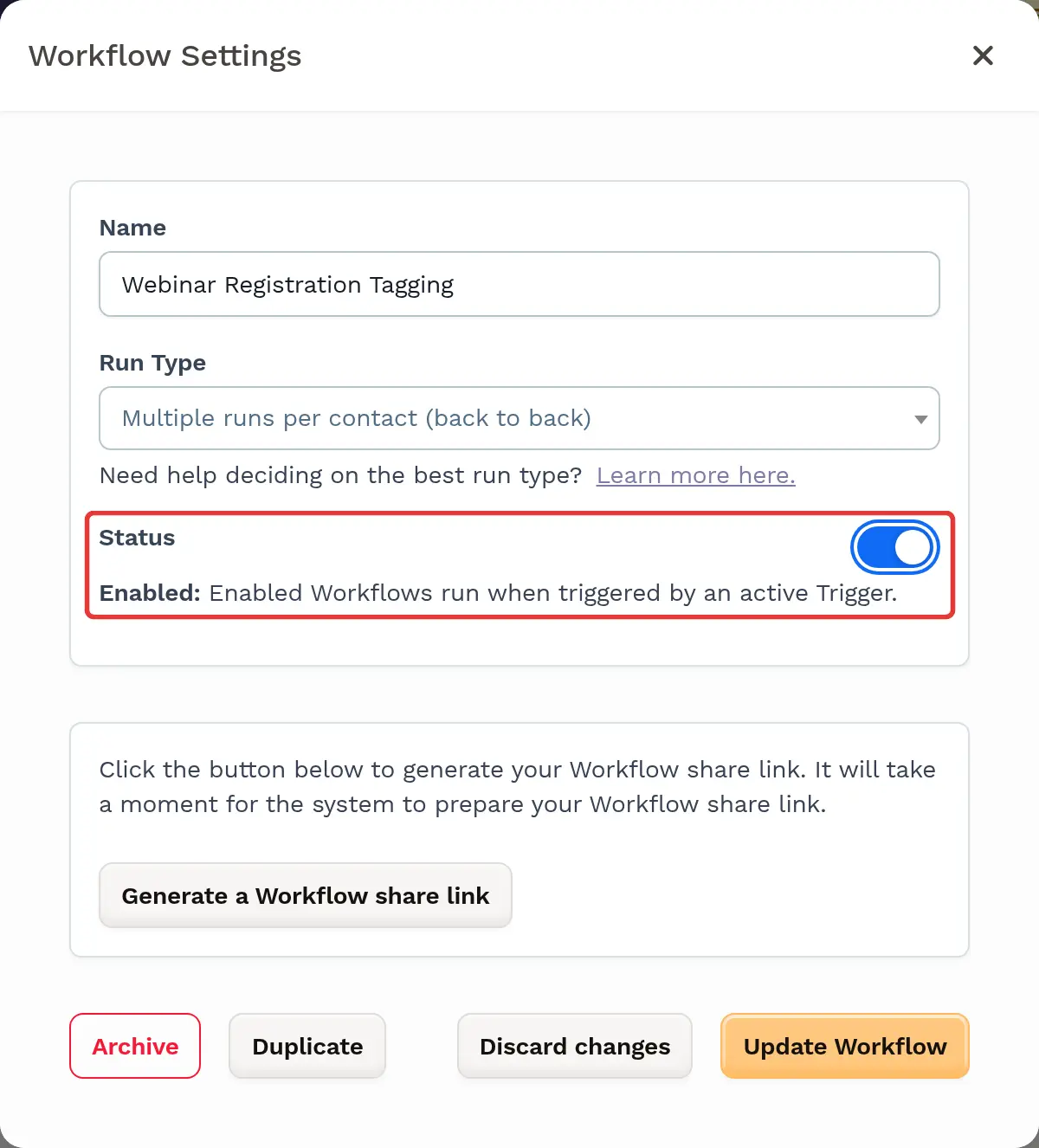
Activate the workflow so it can respond to contacts who meet the trigger criteria: open the workflow’s Settings, turn on Status, then click Update Workflow. Disabled workflows don’t run when triggered.
For the full steps, see Adding Workflows to Funnel Steps and How to Create a Workflow.
Delivering All Access Pass After Purchase
Section titled “Delivering All Access Pass After Purchase”If you are offering lifetime access to summit recordings or bonus content through an All Access Pass, it is important to clearly define how this content will be delivered to your customers after purchase.
One of the most efficient and professional delivery methods in ClickFunnels is to use a Course. Courses allow you to organize content into modules and lessons, making it easier for attendees to navigate the material.
To give you a general overview of how this works:
-
You create a course in the Courses app to your workspace.
-
Inside the course, you can create Modules and add Lessons with videos, downloadable content, or other resources.
-
On the product’s Access tab, click Add access and choose Course to grant access to the course automatically when the All Access Pass is purchased. Alternatively, you can create a workflow and use the trigger “Order - Successful Purchase” to grant course access automatically. This provides an additional way to manage fulfillment and access control based on user actions.
This allows your customers to instantly access summit content in a structured and professional environment, without any manual steps required.
Summary
Section titled “Summary”To successfully set up and manage a Summit Funnel in ClickFunnels, here’s what you need to do:
-
Start from a funnel template (or let Build with AI create the funnel) to get the essential funnel structure.
-
Create a product for the All Access Pass and attach it to the Order Form Page to enable payment and fulfillment.
-
Customize each funnel page to reflect your summit’s messaging, branding, and content.
-
Set up workflows to automate email communication and ensure attendees receive timely access and reminders.
-
Build a course in ClickFunnels to host your summit content and bonus materials for All Access Pass customers.
-
Deliver course access either through the product’s Access tab or by using workflow triggers based on purchase actions.
This setup helps you deliver your summit content efficiently while creating a seamless experience for your attendees.