この記事では、チャット設定内のダッシュボードアプリの統合を確認します。Dashboard Apps を使用すると、MessageHub ダッシュボード内に他のアプリケーションを埋め込んで、カスタマー サポート エージェントにコンテキストを提供できます。この機能を使用すると、アプリケーションを個別に作成し、ダッシュボード内に埋め込んで、ユーザー情報、注文、または以前の支払い履歴を提供できます。MessageHub のダッシュボードを使用してアプリケーションを埋め込むと、アプリケーションは顧客の会話の横に新しいタブとして表示されます。

必要条件
アクティブなClickFunnelsアカウント
MessageHubアプリ
ダッシュボードアプリの追加
歯車アイコンをクリックして [チャット設定]、[チャット統合] の順に開きます。
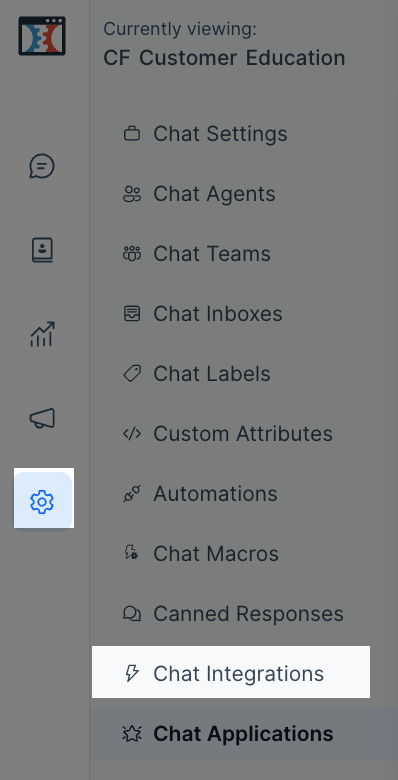
[ダッシュボード アプリ] の横にある [構成 ] をクリックします。

[ 新しいダッシュボードアプリを追加]をクリックします。
次の情報を入力します。
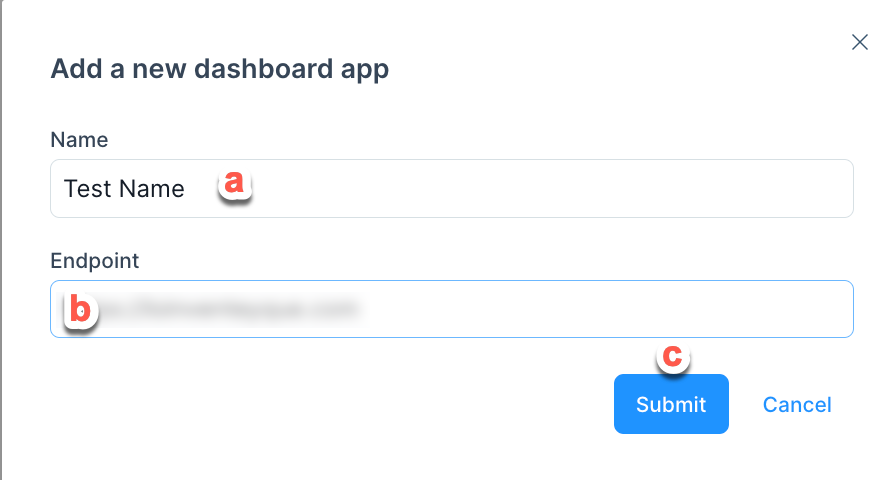
ダッシュボード アプリケーションの名前を追加します 。
アプリの エンドポイント URL を貼り付けます。
完了したら 、[送信] をクリックします。
MessageHubからアプリへのデータの受信
MessageHub は、会話のコンテキストと連絡先をウィンドウ イベントとして送信します。以下で説明するように、アプリで聞くことができます。
大事な
コードの性質はさまざまであるため、サポートチームはカスタムコードやスクリプトをサポートできません。カスタム CSS の設定で問題が発生した場合は、資格のある開発者にご相談ください。
window.addEventListener("message", function (event) {
  if (!isJSONValid(event.data)) {
    return;
  }

  const eventData = JSON.parse(event.data);
});
イベントペイロード
大事な
コードの性質はさまざまであるため、サポートチームはカスタムコードやスクリプトをサポートできません。カスタム CSS の設定で問題が発生した場合は、資格のある開発者にご相談ください。
conversation オブジェクト
{
  "meta": {
    "sender": {
      "additional_attributes": {
        "description": "string",
        "company_name": "string",
        "social_profiles": {
          "github": "string",
          "twitter": "string",
          "facebook": "string",
          "linkedin": "string"
        }
      },
      "availability_status": "string",
      "email": "string",
      "id": "integer",
      "name": "string",
      "phone_number": "string",
      "identifier": "string",
      "thumbnail": "string",
      "custom_attributes": "object",
      "last_activity_at": "integer"
    },
    "channel": "string",
    "assignee": {
      "id": "integer",
      "account_id": "integer",
      "availability_status": "string",
      "auto_offline": "boolean",
      "confirmed": "boolean",
      "email": "string",
      "available_name": "string",
      "name": "string",
      "role": "string",
      "thumbnail": "string"
    },
    "hmac_verified": "boolean"
  },
  "id": "integer",
  "messages": [
    {
      "id": "integer",
      "content": "Hello",
      "inbox_id": "integer",
      "conversation_id": "integer",
      "message_type": "integer",
      "content_type": "string",
      "content_attributes": {},
      "created_at": "integer",
      "private": "boolean",
      "source_id": "string",
      "sender": {
        "additional_attributes": {
          "description": "string",
          "company_name": "string",
          "social_profiles": {
            "github": "string",
            "twitter": "string",
            "facebook": "string",
            "linkedin": "string"
          }
        },
        "custom_attributes": "object",
        "email": "string",
        "id": "integer",
        "identifier": "string",
        "name": "string",
        "phone_number": "string",
        "thumbnail": "string",
        "type": "string"
      }
    }
  ],
  "account_id": "integer",
  "additional_attributes": {
    "browser": {
      "device_name": "string",
      "browser_name": "string",
      "platform_name": "string",
      "browser_version": "string",
      "platform_version": "string"
    },
    "referer": "string",
    "initiated_at": {
      "timestamp": "string"
    }
  },
  "agent_last_seen_at": "integer",
  "assignee_last_seen_at": "integer",
  "can_reply": "boolean",
  "contact_last_seen_at": "integer",
  "custom_attributes": "object",
  "inbox_id": "integer",
  "labels": "array",
  "muted": "boolean",
  "snoozed_until": null,
  "status": "string",
  "timestamp": "integer",
  "unread_count": "integer",
  "allMessagesLoaded": "boolean",
  "dataFetched": "boolean"
}
contact オブジェクト
{
  "additional_attributes": {
    "description": "string",
    "company_name": "string",
    "social_profiles": {
      "github": "string",
      "twitter": "string",
      "facebook": "string",
      "linkedin": "string"
    }
  },
  "availability_status": "string",
  "email": "string",
  "id": "integer",
  "name": "string",
  "phone_number": "+91 9000000001",
  "identifier": "string || null",
  "thumbnail": "+91 9000000001",
  "custom_attributes": {},
  "last_activity_at": "integer"
}
currentAgent オブジェクト
{
  "email": "string",
  "id": "integer",
  "name": "string"
}
最終ペイロード
{
  "event": "appContext",
  "data": {
    "conversation": {
      // <...conversation Object Attributes>
    },
    "contact": {
      // <...contact Object Attributes>
    },
    "currentAgent": {
      // <...currentAgent Object Attributes>
    }
  }
}