ClickFunnels includes a test purchase feature that allows you to test the checkout process in your workspace without connecting a payment gateway. To get started, navigate to Workspace Settings and select Setup Payments, then choose 'Not sure? Start with test mode setup for now.' This article walks you through the updated steps to enable test purchases and ensure your funnels are ready for testing.
Requirements
An active ClickFunnels account
Note:
Test Purchases state is designed for testing purposes only, and live payments cannot be processed. To enable live transactions, you need to connect a payment gateway (e.g., Payments AI) with ClickFunnels.
Only Team Owner has the ability to activate Test Purchases from the Workspace Settings section in the account dashboard. If you are a team collaborator, please ask the account owner to activate the test purchase.
The Test Purchases option only needs to be activated if you want to test your funnels and store without integrating a payment gateway.
How Test Purchases Help
Test purchases provide several benefits, including:
Seamless Funnel Testing: Ensure your funnels work as intended without using live payment methods.
Save Time: Avoid creating or integrating a payment gateway while setting up your funnels.
Risk-Free Transactions: Validate order processes without real monetary transactions.
Testing During Trial: During your ClickFunnels trial, you can explore and test all the platform's features, including the test purchase option, without integrating a payment gateway.
How to Enable Test Purchases
From your ClickFunnels workspace, click on Workspace Settings in the left-hand sidebar.
Select General.
Scroll down to Payment Settings.
Click Setup Payments.
Click "Not sure? Start with test mode setup for now."
.png)
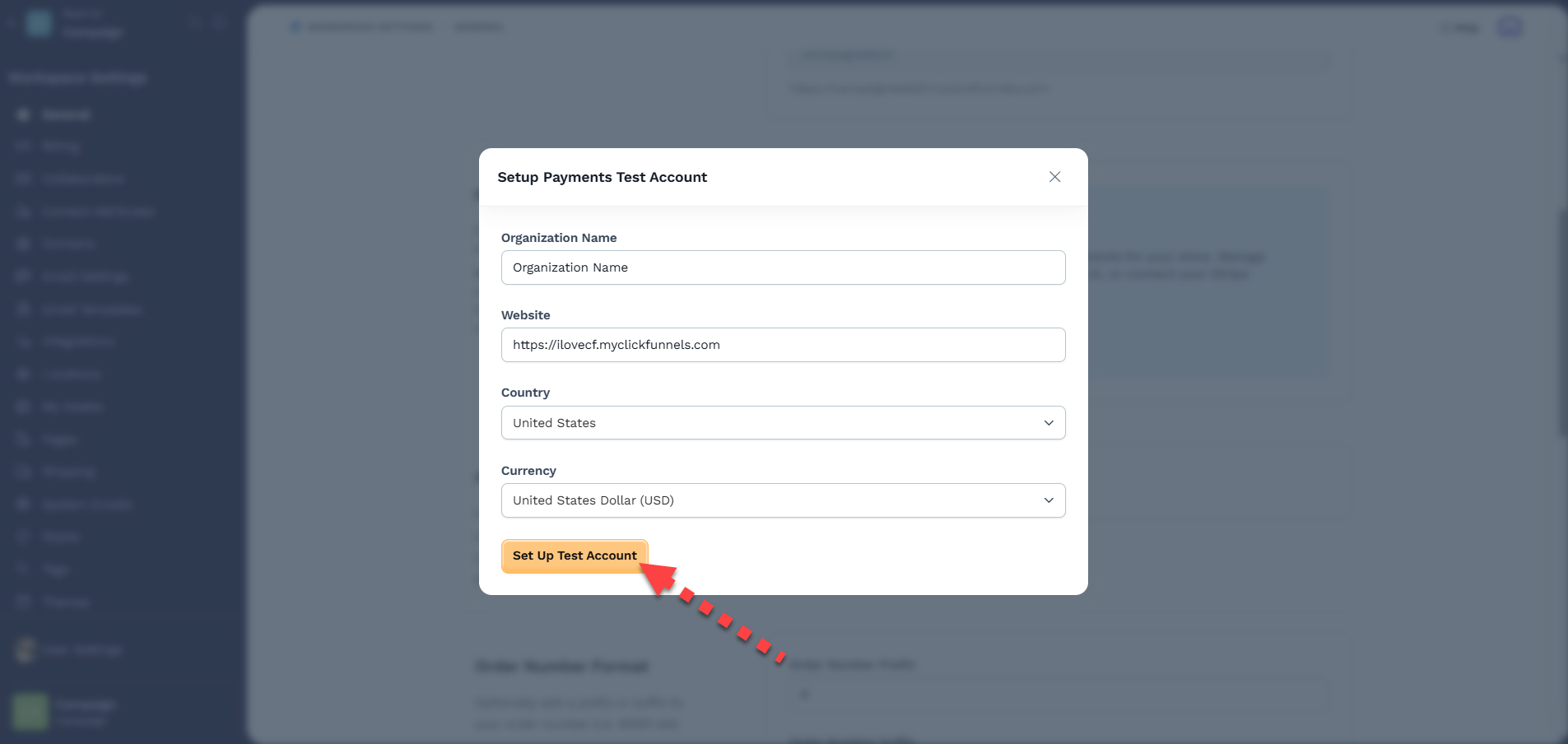
Make any changes if needed, then click “Set Up Test Account.”
Once confirmed, test purchases will be enabled for your workspace.
How to Test a Funnel Checkout Page
Create a Funnel and Checkout Page: Set up your funnel and add a checkout page where customers can complete their purchases.
Preview the Checkout Page: Once TEST mode is enabled, preview the checkout page. You will see a banner at the top indicating that it is in Sandbox mode. The banner will provide test card information (e.g., “Use 4111-1111-1111-1111 as your credit card number”) to use for submitting test orders.
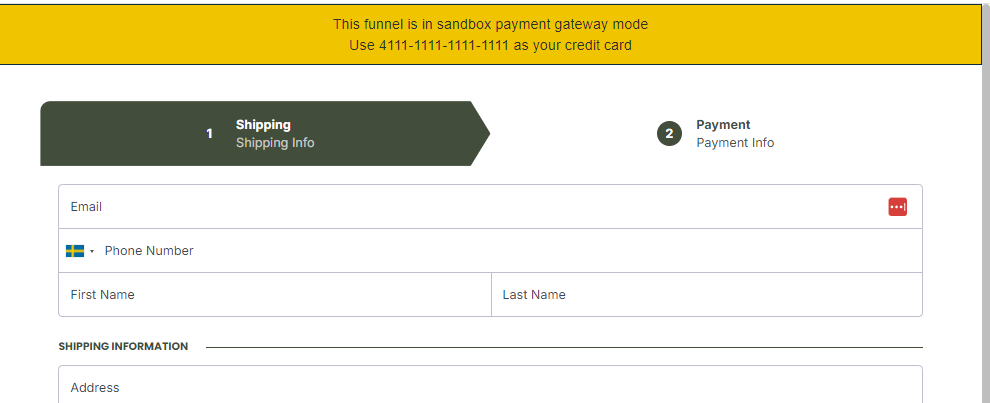
Submit a Test Order: Complete the checkout form using the provided test card information and submit the order. This allows you to experience the checkout process without processing real transactions.
Viewing Test Orders
You can view and validate test orders by following these steps:
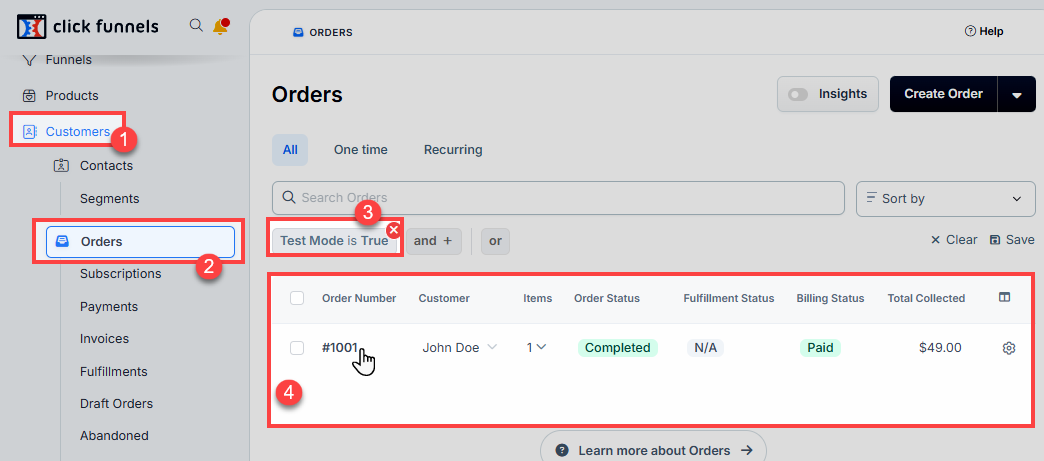
From your ClickFunnels dashboard, click on the Customers menu in the left-hand sidebar.
Click on Orders.
Optionally, apply the “Test Mode is True” filter to display only test orders in the workspace.
The test orders will be listed in the order table. Click on an Order Number to view its details.
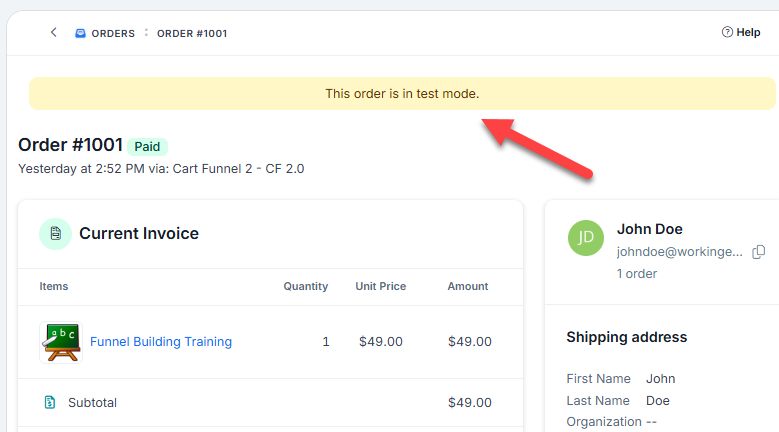
The order page will show the status of the test order, including payment type, shipping details, and any additional information. A yellow banner at the top of the order page will indicate that the order is in test mode.
What Happens When a Payment Gateway Is Added to the Workspace
The Test Purchases feature is designed to test the checkout process without connecting a payment gateway. However, if a payment gateway such as Payments AI is added to the workspace, both live and test transactions can be processed. The test purchases option only needs to be activated if you want to test your funnels and store without integrating a payment gateway. At this point, the test purchase option will no longer be available as a standalone feature. Instead, test transactions can be conducted within the payment gateway's designated test mode. Once a payment processor is integrated, your workspace can accept real payments in a live environment while maintaining the ability to conduct controlled test transactions.